How to set default method per operation for external entity/BCS

As you are reading this post I believe you already know how to create external entity CRUD and specific finder methods and you already have created multiple methods.
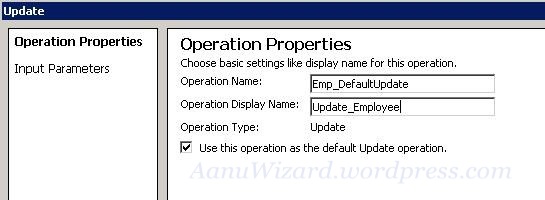
1)    Setting default method for external entity created in SPD. Open SPD and edit your target (finder/updater/creator/delete) method/operation.  Check the “Use this operation as the default finder/update  … operation” and save it. This is always checked when you are creating new operation in SharePoint Designer.

2)    Setting default method for external entity created in Visual Studio 2010.
Open the .bdcm file for your BCS project. Set Default =”True” for your target method.
Make sure that you have only one default method per operation.

Already created external list will not adopt this change. You have to create new external list to get this change in action.

Business Data Related List Webpart


Today I will discuss about how to configure Business Data Related List web part.

Business Data related list will be filtered as per the connected Business Data list webpart.

Ok then Let start.

1) Open your page in edit mode -> chose insert webpart and select Business Data List Web part. Now edit webpart and choose your External entity.

Here I have Chosen Project Entity.

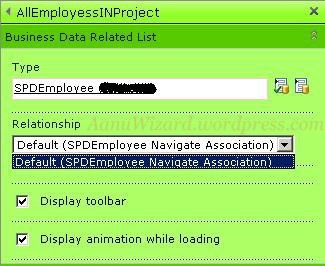
2) Next add Business Data Related List Webpart and edit its property. Choose related entity. Here I have chosen Employee entity. Here you need to configure the Association method.  This entity should have association method.

The Relation between Employee and Project Entity is like Each Employee is assigned to a Project. Now We need to display all employees that are assigned to a particular project.

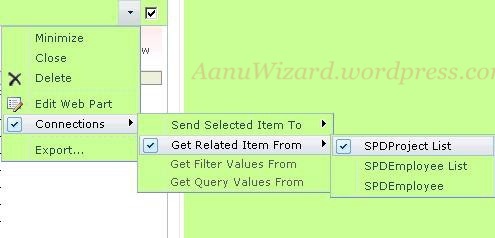
3) Make sure you have Allow Connection checked and the Business Data Relation List Web Part  connected with  Business Data List web part.

That’s it. We have configured our Business Data Related List webpart.

Enjoy..!! 🙂

Error : BCS service is not associated with web application

Problem:

I was trying to create external content type using SharePoint Designer and got error message after installation of beta 2 and can not create external content type using SPD.


Workaround:

1)   Start BCS service on server farm if it is stopped. [SharePoint Central Administration -> Services on Server]

2)   Now you will need to create BCS service for your web application.

[SharePoint Central Administration -> Application Management -> Manage Service Application -> Create New BCS Service.]

3)       Now check it through SharePoint Designer, It should work.

Hope this will help.