SP2010 List View and CAML : Part 2

In Part 2; I will discuss about little complex scenario.

Let’s take an example that we have a Task List. Each task is assigned to an employee by “Assigned To” field. Each task has a DueDate set on it.

Now we need to make a view that only managers can view. This view should show all tasks those have their due date more than past 7 days.

By this view Manager can find all employees who have not completed their tasks. 😉

Hope That helps..!!

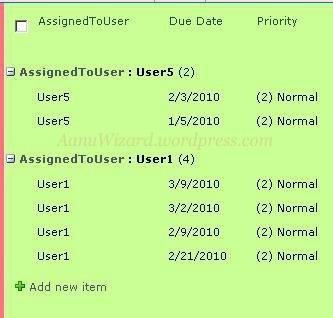
And your view will look like this:
SP2010 List View and CAML : Part 1

In Part 1; I will discuss about achieving List view by file type in CMAL query.

Let’s take an example that we have a Document Library which has different type of documents, images.

<Where>

<eq>

<FieldRef Name=”DocIcon”/>

<Value Type=”Computed”> your file type comes here </Value>

</eq>

</Where>

If you want to view all documents then CAML query will be like following:

<Where>

<eq>

<FieldRef Name=”DocIcon”/>

<Value Type=”Computed”> docx</Value>

</eq>

</Where>

Hope That helps..!!


SharePoint 2010 List View by content type

You can filter your list view by content type.


This is very simple.

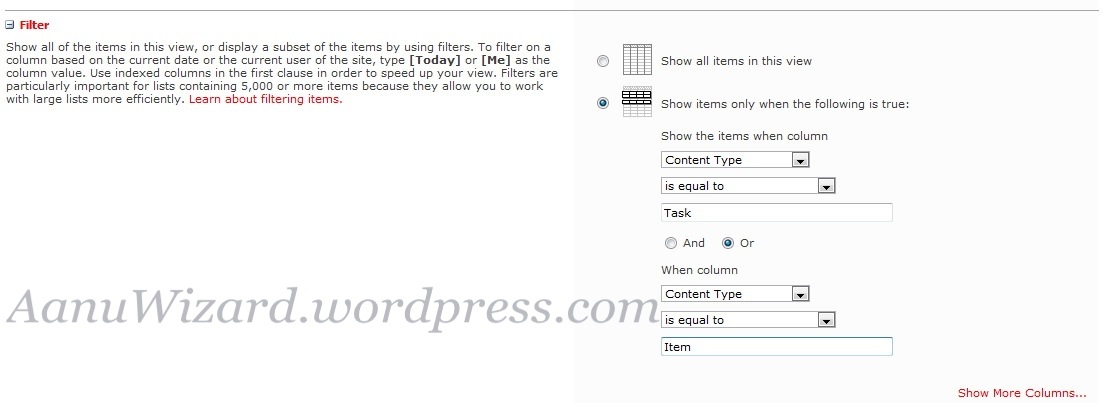
1) Open your view settings-> Filter option

2)  select ‘Show items only when the following is true’.

3)  In condition: Select Column = “Content Type” Operator = “is equal to” and type your contentTypeName (in value text field) .

That’s it. Your List view is now filtered by content type.

Hope this helps.