This post is article 29 from the 30 Articles App series for SharePoint
Future of Auto-hosted apps :
A few blogs from SPC14 say about AutoHosted Apps are being deprecated, This could be a rumor as Microsoft has not yet confirmed anything officially on this. If they are not being deprecated in near future, for how long they will be supported or when they may go from preview to fully supported is still not clear. As they are still in Preview, they should be avoided for Production design and recommended for only prototyping .
Some new Infographics for Apps:
These infographics can be downloaded from here . They give good and quick understanding on Why to build SharePoint apps?, App Concepts, App – hosting options, Data storage/access options etc.
New Office Web Widgets:
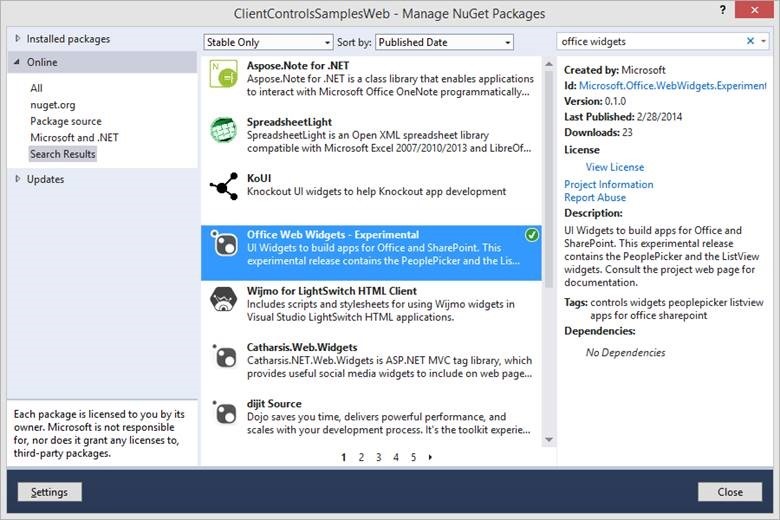
These experimental UI widgets were announced at SPC14 and are intended to help building apps for Office and SharePoint. The first release includes People Picker and the List View widgets. As per the Office dev team, these widgets are “experimental” and its primary goal is to collect feedback. They plan to release these controls for production use soon. Download it from NuGet Manager (search for Office Widgets) . Try it and send your feedback on UserVoice using the Office Web Widgets category.
New Office 365 SDK for Android Preview:
Finally Microsoft is thinking openly ;). this sdk is built by MS Open Tech and provides access to:
• Microsoft SharePoint Lists
• Microsoft SharePoint Files
• Microsoft Exchange Calendar
• Microsoft Exchange Contacts
• Microsoft Exchange Mail
The SDK is composed of three independent packages, so that you can import only the SDK that you need in your project.
- office365-files-sdk [depends on office365-base-sdk]
- office365-lists-sdk [depends on office365-base-sdk]
- office365-mail-calendar-contact-sdk
For more info on this refer to http://msopentech.com/blog/2014/03/03/new-open-source-sdk-for-android-brings-office-365-apps-to-life/
External links to SPC14 Summary articles from SharePoint Community folks:
- CHRIS O’BRIEN’s an-implementers-summary – http://www.sharepointnutsandbolts.com/2014/03/an-implementers-summary-of-SPC14.html
- Jeremy Thake’s top 5 takeaways – http://www.jeremythake.com/2014/03/my-top-5-takeaways-from-the-sharepoint-conference-2014-spc14/
- Sahil Malik’s what you need to know – http://blah.winsmarts.com/2014-3-SharePoint_Conference_-SPC14_What_you_need_to_know.aspx
- Nik Patel’s future of InfoPath – http://nikpatel.net/2014/03/08/future-of-infopath-spc14-notes-from-office-and-sharepoint-forms-roadmap-update/



 aanuwizard.com