Article 18 from 30 : Tenancies and app scope for SharePoint Apps

This post is article 18 from the 30 Articles App series for SharePoint

In this article, I will discuss about tenancy , app scope and how does that affect the app.

What is Tenancy?

A Tenancy in SharePoint 2013 is a set of site collections.

In SharePoint Online (ex. O365 SharePoint environment) this set of site collections belong to a single customer account.

For on-premise, it could be all of the site collections from the web application, some of it or it can be from multiple web applications as well.

A tenancy can have an app for SharePoint app catalog just as a SharePoint web application can.

What is App Scope?

Tenant administrators can decide the app scope for an app either tenant scope or web scope.

App scope is neither the feature scope nor the app permission levels used while developing the app.

If the app is uploaded to the SharePoint app catalog of a tenancy, it is available to all the websites within that tenancy. It can be installed website-by-website basis. App installed this way have web scope.

If Tenant administrator batch install the app to a subset of websites within the tenancy, then the apps have the tenant scope. Tenant administrator can decide on which websites within the tenancy the app can be installed.

The interesting part comes here 🙂

If an app that includes an app-web is batch-installed, only one app web is created and it is shared by all the host websites on which the app is installed. The app web is located in the site collection of the corporate app catalog.

So you as an app-developer cannot decide the app scope. Only the tenant admin can choose the app scope by choosing the relevant deployment method for the app.
Article 17 from 30 : Using Remote Receivers to handle spappweb list/listItems events

This post is article 17 from the 30 Articles App series for SharePoint

In article 16, we have seen how we can use remote event receivers to handle App related events.

In this article, I will discuss about how you can handle list-events remotely.

I am talking about a scenario when you have some data in sharepoint artifacts; And you want to handle any change remotely.

Let’s take an example. We have a Issue-List in our cloud-hosted app and we want an engineer(s) will receive an email whenever a new entry is created.

We need to handle the ItemAdded event for our Issue-List.

Ok. Let’s get started :

In my App I have already created the Issue-List.

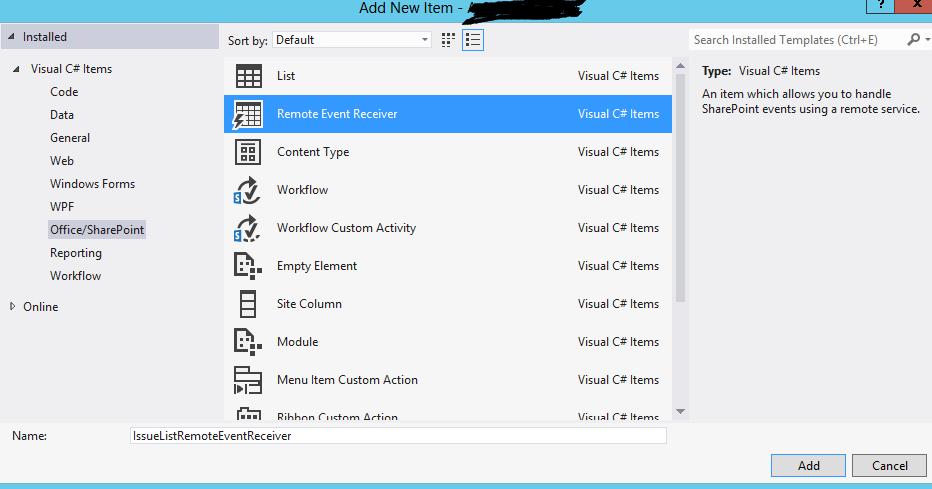
Now select sharepoint-app project and -> add new item -> remote event receiver

remoteReceiversList1

remoteReceiversList3

This will generate new service in your web-project and also make necessary changes to app-manifest.

remoteReceiversList4

There you go. Now you can handle list item-added event.

Hope that helps.


Article 16 from 30 : Using Remote Receivers to handle app events

This post is article 16 from the 30 Articles App series for SharePoint

Today I will talk about how to handle app events with Remote Event Receivers !!

Do you need to perform some precise tasks when your app is installed or upgraded, well then you must use Remote Event Receivers.

Remote Event Receivers are only available to cloud(auto/provider both) -hosted app but not to SharePoint-Hosted app. [ When you try to add event receivers to SharePoint-hosted app it will be automatically converted into auto-hosted app !!]

How to create event receiver for your app-events:

Go to your SharePoint-app project -> Right click and go to property => Now set value =true to “Handle App Installed” and rest of the events that you want to handle.

remote_App1

This will generate AppEventReceiver.svc service in your web-project and also make necessary changes to app-manifest as below:

remote_App2

In the ProcessEvent method you can handle app related events… App Installed, App Upgraded, App Uninstalled

Pass the second variable true for SPAppWeb-clientcontext and false for SPHostWeb -clientcontext to the CreateAppEventClientContext method of TokenHelper.

Hope that helps.

Â
