This post is article-9 from the 30 Articles App series for SharePoint.
In this article we will find out some technical limitation or may overcome it somehow 😛
Recently, this thought is surrounding my mind and my time 🙂
Question : Can I create a Mobile Native App that talk directly to the App web. To simplify the scenario let’s say Windows Mobile App.
Link to my question I asked in the MSDN forum is here.
Scot Hillier (SharePoint MVP) has suggested a nice idea about architect it the other way
Here is what Scot says when I asked him the same question:
” “create a mobile app for SharePoint app web”, I’m scratching my head a bit wondering why. I have not tried yet, but it seems that in theory you could enter the URL of the app web into the phone app development wizard and see the available lists. I’d have to try. But again, why?
Why not either build the phone app against a SharePoint list in the SharePoint farm or build a phone app against a cloud data source – like a RESTful endpoint. In both cases, a SharePoint app could utilize the same data. So you could have a phone app and a SharePoint app (and an Office app, too).
So it seems to me there are better ways to architect the solution.”
However I still want to investigate this approach for some hidden challenges :
- Your client is not happy to give create list permission to the Host web for your app [50% will not allow to create a list for some App into your farm ; rest 50% would prefer if the App doesn’t ask for such permissions… my opinion ]
- In addition to (1), If you have to create SharePoint Artifacts then you can’t go with Cloud source
- As per my knowledge No one has tried this yet and so I have to try this to see what else is there beyond theory !!
Below is what I am getting while trying to create Mobile App for my App web :
An error : “The remote server returned an error : (403) Forbidden.”
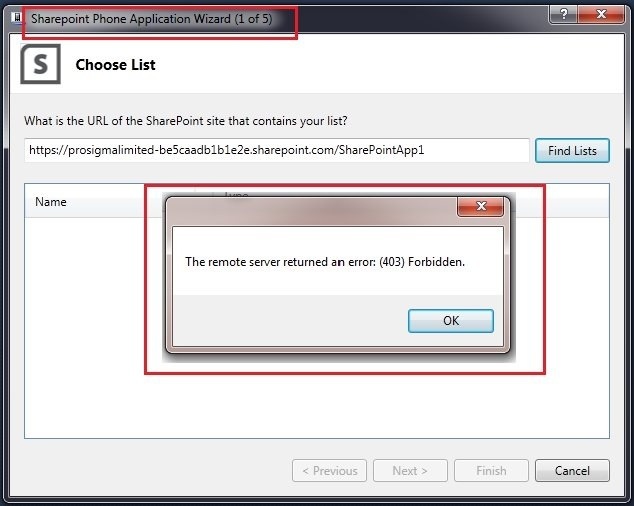
I am in search of a way for getting rid of this error if possible. Would love to hear your opinions on this.
Shall I count this error as “NO” to the question and consider it as the technical limitation of SharePoint 2013 App Model? Are the app webs not accessible through apis ?…. will make an update here stay tuned !!
UPDATE [ added on 19/10/12 11:00am ]
It looks like no native mobile app can talk directly to app web. May be It’s not supported. However I am still waiting for confirmation.
So for now, In conclusion to chose the best practice in context with Mobile devices : Mix of auto-hosted and/or provider hosted is one of the option which is preferable. Again keep in mind that if the App is to be subject of high scalability then tons of money + time for maintaining that data in cloud will be required. Well designed HTML App can be your saver for Mobile devices headache..!!
Also have a look to Rainer’s comments below on this subject.
I hope this RND and possible workarounds will help you to choose right approach if you are considering building native mobile app for an SharePoint app.
Have a nice weekend you all and we will meet again for next article 🙂 !!
Note : This article up to above updates was written for SharePoint 2013 preview.
UPDATE : [ Added on 09/11/2012 16:30 ]
Note : SharePoint 2013 RTM has been released on 24 October 2012.
So finally I have received a reply and confirmation from Microsoft Insider( Rob M. Howard) that it is actually possible.
I am not sure that this is the change from preview to RTM or it was actually supported in preview as well.
Huge thanks to the Sharepoint App product team and to Rob for this confirmation.
The good news is yes it is supported in SP2013.
In addition to this; to understand how this works here is what Rob says
“Yes, it is possible. You would authenticate the app web the same way you would authenticate to any other web in the SharePoint site. For example, you can authenticate to SharePoint Online webs in Windows Phone applications using the procedure described at the link below:
http://msdn.microsoft.com/en-us/library/jj163079(v=office.15).aspx#SP15Mobileclientauth_advance
For SharePoint Online authentication from mobile apps in general, you can load a browser control for the user to authenticate to SharePoint, and then retrieve the authenticated cookie from the browser control and use it on subsequent requests made by your application. “
Hope that helps..!!

 aanuwizard.com