Article 22 from 30 : Troubleshooting Provider-Hosted App

This post is article 22 from the 30 Articles App series for SharePoint

In this article I will be discussing about basic guidelines on troubleshooting tips for provider hosted apps. I assume that you already has good understanding of provider hosted app and how to develop one.

Below are some steps you should consider to look into when you run into problems:

(1)    Make sure your remote web is already up and running before you deploy your app.

(2)    Make sure all the service are up and running and they have valid listening endpoints if you are using any remote receivers.

(3)    Make sure that you have valid client id in App manifest file, which must be exactly same as client id in your remote web’s web.config file

(4)    Make sure the client id is in lowercase in (3).

(5)    Make sure you have registered your app with SharePoint. You can register your app from Appregnew.aspx  page. It is available via following url : https://SPServer/Sites/AnySiteCollection/_layouts/15/Appregnew.aspx

Store the client id and secret and use that in (3)
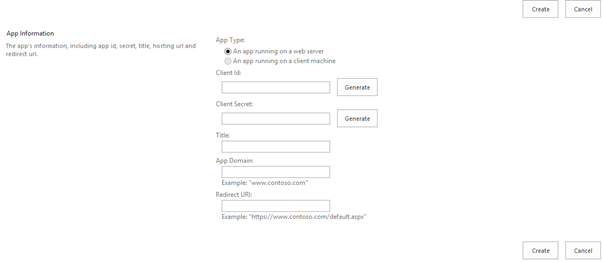
appregnew

(6)    When you are deploying your app to office store you can generate client id, Client Secret from office seller-board.

(7)  Make sure your app has all the necessary permission.

Troubleshooting tips continues for Hight-Trust provider hosted app in next article.

Hope that helps..!!

Article 21 from 30 : what can be included in SharePoint App?

This post is article 21 from the 30 Articles App series for SharePoint

One of the common question I get from many readers is that what possibly they can do with SharePoint App? So here in this article I will discuss about what possible SharePoint artifacts and components you can include in an App.

One explicit limitation of the SharePoint App Model is that no server-side code can reside on the SharePoint farm as part of an App, and so if your app need to use any server-side code then it must be hosted outside of SharePoint either in the cloud or on-premises. So and when applicable any use of server-side code need cloud App Model. And the main benefit is that you can always scale your application without affecting the current SharePoint environment.

So here it begins, You can create/include all sort of SharePoint components mentioned below in your SharePoint App :

Fields (of field types that are built into SharePoint)

Custom content types

Custom List templates

List and library instances

Custom list views

Custom list forms

Remote event receivers -> check Article -17, 18 for more details

Custom actions (including shortcut menu items and ribbon customizations) -> Check Article -12

Modules, Pages, CSS, JavaScript files used by SharePoint pages,

SharePoint WebParts (built-in) and app parts -> Check Article -8

You can also include Features (Web-scoped only), Web templates (but not site definitions), BCS Models (web-scoped only), external Content types and external lists referencing to that BCS Model, Property bags; and Workflows (SP2013 workflows now use Azure hosted workflow runtime. Coded workflows that use the SharePoint-hosted workflow runtime cannot be included in an app for SharePoint.Only declarative workflows or workflows that use the newer runtime are allowed. to see what’s new in SP2013 workflow check this)

Article 20 from 30 : Implementing Cross Domain calls

This post is article 20 from the 30 Articles App series for SharePoint

I assume you have read article -19 to understand basic about cross-domain calls in SP Apps.

In this article I will discuss about implementing cross-domain communication from an SharePoint app.

crossdomaincalls

  • Let’s get started with placing SP.RequestExecuter.js library ( you can find this in LAYOUTS folder ) into you app project. you can put this file in scripts folder in your app project.
  • Register the trusted domain(s) in your app manifest like below.
    Lets say for example I want to put otherdomain.com as a trusted domain so I am registering that as following.

     <AppPrincipal> 
       <Internal AllowedRemoteHostUrl="https://otherdomain.com/" /> 
     </AppPrincipal>
    
  • With this library you can use REST or JSOM to communicate with SharePoint
  • For REST option you will need to create a new SP.RequestExecutor as following.
    var executor = new SP.RequestExecutor(appweburl);
    executor.executeAsync(
    {
    url:
    appweburl +
    "/_api/SP.AppContextSite(@target)/web/lists/getbytitle('aanuslist')?@target='" + targeturl+ "'" ,
    method: "GET",
    headers: { "Accept": "application/json; odata=verbose" },
    success: successHandler,
    error: errorHandler
    }
    );
  • If you choose JSOM then get client context as below.
    var context = new SP.ClientContext(appweburl);    
    // context: The ClientContext object provides access to the web and lists objects. 
    var factory =  new SP.ProxyWebRequestExecutorFactory(appweburl); 
    // factory: Initialize the factory object with the app web URL. 
    context.set_webRequestExecutorFactory(factory); 
    var contextt = new SP.AppContextSite(context, targeturl);
    
    //Get the web and list objects and prepare the query 
    var web = contextt.get_web(); 
    var list = web.get_lists().getByTitle("aanuslist"); 
    var camlString = "<View> <ViewFields>" +
                     "<FieldRef Name='Title' />" +           
                     "</ViewFields> </View>";
    var camlQuery = new SP.CamlQuery(); 
    camlQuery.set_viewXml(camlString); 
    allItems= list.getItems(camlQuery); 
    context.load(allItems, "Include(Title)"); 
    //Execute the query with all the set options and parameters 
    context.executeQueryAsync(successHandler, errorHandler);
    
    
  • Make sure in both scenarios your page includes reference to the cross-domain js library

Happy reading… and see you guys for the next article 🙂