SharePoint 2010: customizing quick launch to pick up 3 or more level of sub-menu items : part-1

In this post, I will discuss about how to customize quick launch to pick up submenu items.

SharePoint populates the quick launch from site’s master page.

This post is part 1 from the Quick Launch series,

part-1 : customizing quick launch to pick up 3 or more level of sub-menu items

Part-2 : How to add 3 or more level of menu items in SharePoint quick launch

Part-3 : How to show/hide SharePoint Quick Launch for users with specific permission

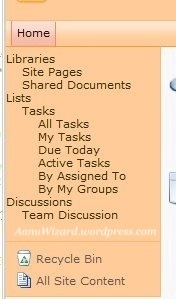
You must have noticed that by default quick launch menu items appears only with two levels.

We need to make our custom master page so lets begin.

  • Open site’s default master page in SharePoint Designer.
  • Copy all contents and close / uncheck out it. [Never make changes in this file]
  • Create your custom master page and paste all contents. [I believe that you have basic idea about how to create and deploy custom master page]
  • Find control id=”V4QuickLaunchMenu”
  • Change StaticDisplayLevels=”3″ MaximumDynamicDisplayLevels=”3″
  • Save and deploy it to your site.
  • Go to SharePoint Designer -> Open your site -> MasterPages -> choose your custom master page
  • Right click and select ‘Set as Default Master Page’.
  • Do IISRESET if required and check your site in browser to view changes
  • Change StaticDisplayLevels and MaximumDynamicDisplayLevels property as per the level of menu items you want to display in Quick Launch.

20120314-105132.jpg

20120314-105157.jpg

Hope that helps..!!

SharePoint 2010: BCS Error – The Field provided as input but cannot be found on the ‘Updater/Creator’ method

Problem:

When you deploy your BCS nodel and try to update/create your entity, the updatercreator form will show you below error.

The Field named ‘myEntityID’ is provided as input but cannot be found on the ‘Updater/Creator’ method signature for Method with Name ‘UpdatemyEntity’ on Entity (External Content Type) with Name ‘myEntity’ in Namespace ‘myBDCModel’.

Solution:

Go to your BCS Model in visual studio.

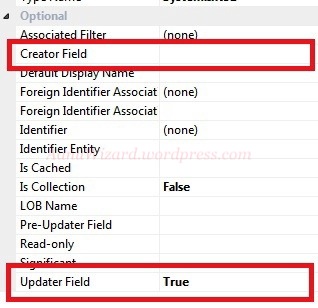
Make sure you have set creator/updater property = true for all fields that you want to include in update/create operation.

SharePoint 2010: get All checked out documents report with checkedOut column

Problem:


How to achieve a report to retrieve All checked out documents in site collection with Checked out column.
I hope this help you to understand choosing right approach to solve your problem.

Workaround:

Content and Structure Reports
Lets start with what SharePoint gives in-Built option – Content and Structure Reports.
These are really good, ready to use reports. You can customize the filter condition here but no option to customize the report columns.
Checked Out To Not Equal to and you are done for getting all checked out documents.
But if you need to choose the ‘checked out to whom’, then this will not work.
SSRS
Lets look at to SSRS (SQL SERVER Reporting Service) with SharePoint :
You will get full customization for filter condition and report columns also.
But it is limited to one list/library. So this will also not work for our problem.
Content Query Web Part
Content query web part is the right choice for this problem.
Few reference to start with this:
  1. http://www.the-north.com/sharepoint/post/Further-Customise-CQWP-to-Display-Draft-and-Checked-Out-Pages-By-User.aspx
  2. http://www.the-north.com/sharepoint/post/Embed-CAML-Queries-into-the-Content-Query-Webpart—Finding-Draft-Publishing-Content.aspx
  3. http://www.heathersolomon.com/blog/articles/customitemstyle.aspx
  4. http://blogs.msdn.com/b/ecm/archive/2006/10/25/configuring-and-customizing-the-content-query-web-part.aspx
Your Custom webPart
This will give you full control to everything.
To solve our problem you will need to use SPSiteDataQuery.

Hope that helps…